What makes PepLabo a better Lose It! alternative?
Lose It! asks how much you ate today. PepLabo asks what you injected, from which vial and where. That difference in the starting question shapes everything below.
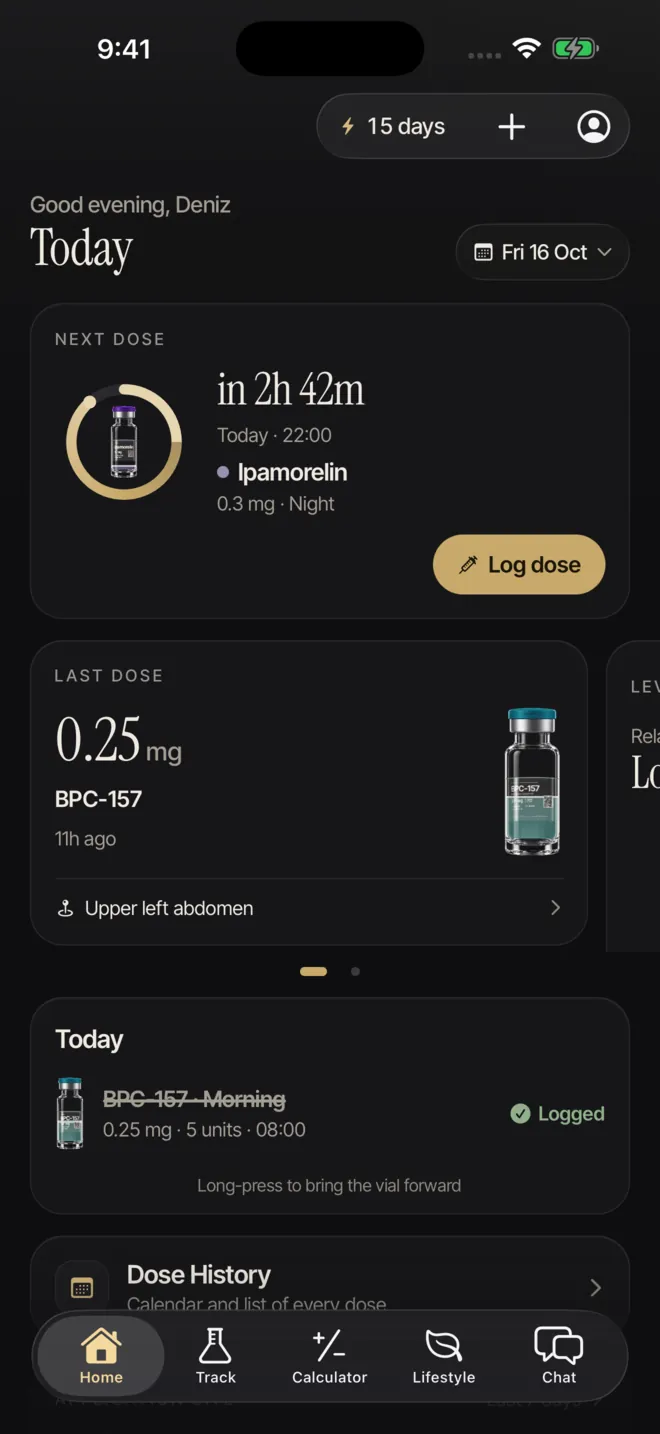
The home screen is your next dose
PepLabo opens on the dose that is due next: the compound, the time and the vial it will be drawn from. One tap logs it, inside the app or from a widget or the Live Activity on Pro. Water, weight, meals and how you feel are laid out around that entry, because in an injection routine the dose is the event the rest of the day is measured against.
Lose It! opens on a calorie budget. Its GLP-1 support adds a medication log and an estimated level view [1], which is useful context, yet the medication still lives inside a food-and-weight plan.
Bottom line: when the dose is the fixed point of your week, an app that begins there takes less effort to keep up.
Vial stock and reconstitution in the same app
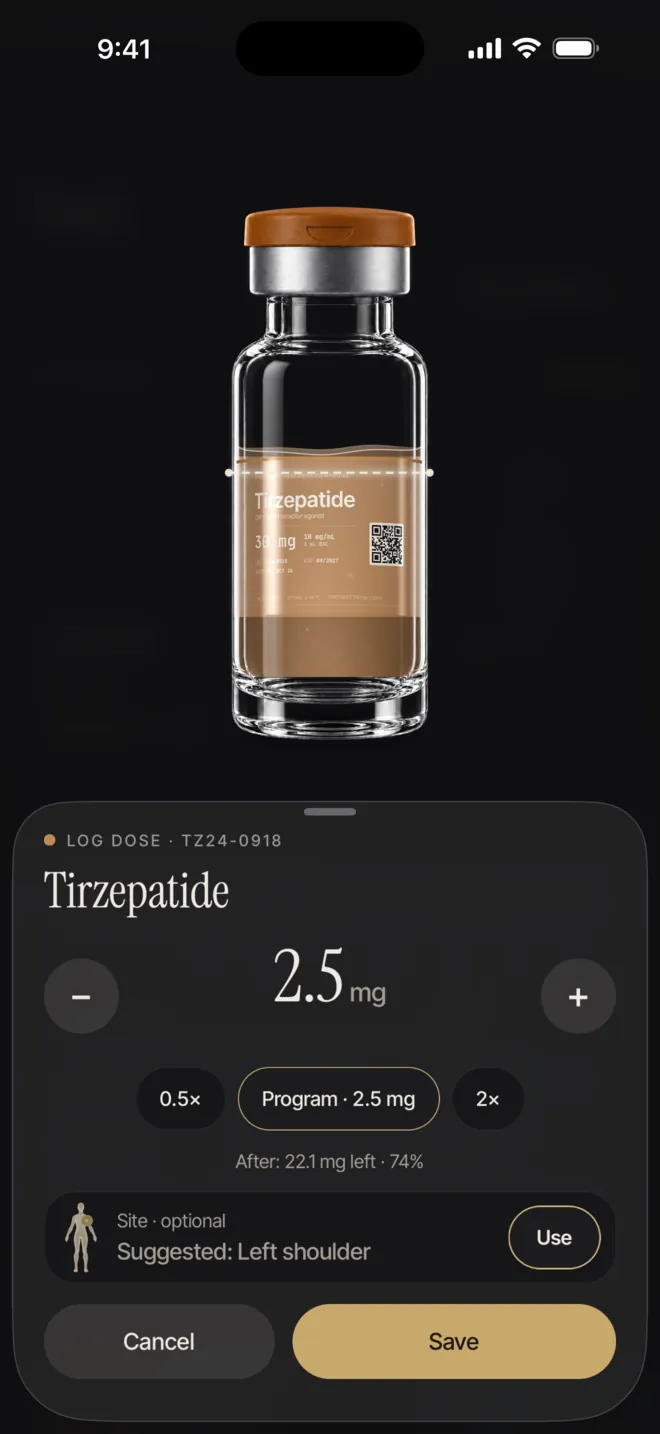
Many peptides come as a powder in a vial. Before the first dose you add bacteriostatic water and work out how many units on an insulin syringe match the amount you were prescribed. PepLabo’s calculator does that conversion, and once the vial is saved, each logged dose is subtracted from it. A vial that is close to empty shows up days before you reach for it.
We found no vial tracking or reconstitution tool in Lose It!’s listing or on its website [1][3], so that part of the routine would otherwise stay on paper or in a second app.
Bottom line: PepLabo takes over the notebook and the separate calculator that mixing vials usually needs.
Peptides, several programs and real cycles
Lose It!’s medication feature is written for GLP-1 users [1]. PepLabo is built for anyone running injections, whether that is a weekly GLP-1, a daily peptide or both at once. Each program keeps its own compound, schedule, on and off periods and weeks off, so a planned break does not look like a gap in your log.
The estimated level chart works across all of them. It uses a half-life you enter from your own source and shows how logged doses overlap. Lose It! also shows estimated GLP-1 levels with phases [1]; PepLabo extends the idea to every compound you track. It is a picture of your log, never a recommendation.
Bottom line: if your routine has more than one compound or a cycle with breaks, PepLabo keeps that shape intact.
Sites and side effects, tied to the dose
Rotating between abdomen, thigh and arm is easier when the last site is on record. PepLabo saves the site with every dose and shows the rotation on a map. A few hours after a dose, it can also ask how you feel.
The side-effect check-in covers energy, sleep, mood, symptoms and an overall severity, and it can be linked to any dose from the past 72 hours. Over the weeks, scattered notes become a timeline you can read against your doses. Lose It!’s phases relate the medication to hunger and eating habits [1]; we did not find a side-effect log or site tracking in its listing [1].
Bottom line: PepLabo connects how you feel and where you injected to the dose itself, so your record can answer questions about a specific shot.
Reminders that catch a missed dose, at home or abroad
PepLabo can remind you before a dose, at the scheduled time and again if nothing has been logged. That last reminder is the one that stops a late dose from quietly turning into a skipped one.
Travel mode on Pro lets you pick the destination time zone and how the schedule should shift, and the reminders follow your choice. We did not find medication reminders in Lose It!’s App Store listing [1].
Bottom line: PepLabo’s reminders are built for doses and keep working when your clock changes.
Private by design, with a report you can share
You can install PepLabo and start logging without creating an account. Records stay on your phone, and the app ships without analytics, advertising or tracking SDKs. Signing in is only needed for Pep AI, and before your first message the app shows what will be sent and states that dose amounts are excluded.
When you do want to share, PepLabo Pro produces a PDF of your dose log for an appointment, and the full data export is free on every plan. Changing phones works through that export file rather than a cloud account: a little less convenient, but your health records stay where you put them.
Bottom line: PepLabo keeps injection records under your control and still gives you a clean report when you need one.
Pep, streaks and badges keep the log complete
A log is only as useful as the days it does not miss. PepLabo keeps a logging streak, awards badges for milestones such as a first weigh-in or a first progress photo, and on Sundays Pep, the character inside the app, sums up your week.
Pep also reacts during the day, pointing out when water is low and celebrating a streak with you. On Pro, Pep AI chat can summarise your programs and records; it never gives dosing advice.
Bottom line: PepLabo makes daily logging feel lighter, and a lighter habit is one that lasts.
Where Lose It! is still better
As a calorie counter, Lose It! does its job well. If weight loss through calorie counting is the centre of your plan, it offers things PepLabo does not try to cover:
- A personalised calorie budget and weight-loss schedule, with 25+ health goals to choose from [1].
- A global database of 56+ million foods and recipes [1].
- Intermittent fasting and advanced metrics such as blood pressure, glucose and body measurements on Premium [1].
- Friends and support groups in the free version [1].
- A native iPad app and eight app languages [1].
Bottom line: PepLabo pulls ahead in another situation: when the dose, the vial and the cycle are what you have to get right.
Pricing comes down to what the free plan covers
PepLabo’s free plan covers the injection routine itself: dose logging, reminders, vials, injection sites, the reconstitution calculator and the research library. PepLabo Pro costs $9.99 a month or $59.99 a year in the US, and eligible new subscribers get 3 days free on the yearly plan. Pro adds access to Pep AI chat, meal estimates from a photo, voice or restaurant menu, Apple Health, Health Connect and WHOOP data, widgets, travel mode and PDF reports.
Lose It! is free to download, with calorie tracking, a weight-loss plan and community support in the basic version [1]. Its listing places photo and voice meal logging, barcode scanning, fasting, advanced tracking and device syncs in Premium, mentions a yearly subscription with a free trial, and does not state prices [1].
Bottom line: for the injection side of your routine, PepLabo’s free plan already does the work.
Running PepLabo alongside Lose It!, or on its own
If Lose It! already holds your calorie history and fasting plan, there is no need to drop it. Keep it for food and weight goals, and give PepLabo the injection side: doses, vials, sites, cycles and side effects. The two apps do not exchange data, so each stays focused on its own job.
If meals are only part of the picture, PepLabo can cover them too. Barcodes are free, and Pro estimates a meal from a photo, a voice note or a restaurant menu, right next to the dose it relates to.
Bottom line: pair them when calorie counting is a project of its own; switch completely when the injection routine is the project.
Overall
Lose It! is a mature calorie counter, and its GLP-1 support gives weight-loss users a helpful view of their medication. PepLabo is the better pick when the injections themselves need managing: peptides as well as GLP-1 medicines, vials to mix and track, sites to rotate, cycles with breaks and reminders that notice a missed dose. It holds all of that in one private app, and the core is free.
Trademarks and sources
Lose It! is a trademark of FitNow, Inc. PepLabo has no affiliation with FitNow, Inc. Everything said here about Lose It! comes from its public App Store listing, Google Play page and website, read on 20 October 2026, and may have changed since. “Not mentioned in the sources we read” means we could not confirm a feature there, not that the app lacks it.