What it is
The chat lives in the Chat tab. The first time you open it, a short screen called “How the assistant works” explains what it does and asks you to choose Agree and continue or Continue without AI. Replies come from Google Gemini through PepLabo’s server, and every AI reply carries the caption “AI reply · not medical advice”.
Without AI, or if you turn it off later under Settings › Privacy, the chat still answers record questions with replies built from your own data on the phone. Pro gives access to the AI replies; a free account gets a small daily try.
Questions it answers well
- “Summarise my saved stack”: active programs, vials on your shelf with the share left and roughly how many days they last, and how many doses you logged in the past 7 days.
- “Show my recent doses”: your latest dose logs as you entered them, including skipped ones.
- “How is my cycle going?”: for each program, the current phase, which day of it you are on and when the next change comes.
- “How do I log a dose?” and similar how-to questions, with a button that takes you to the right screen, such as Track, dose history or the calculator.
- Reconstitution arithmetic with the numbers you provide: the vial amount, the water you added and the amount to work out.
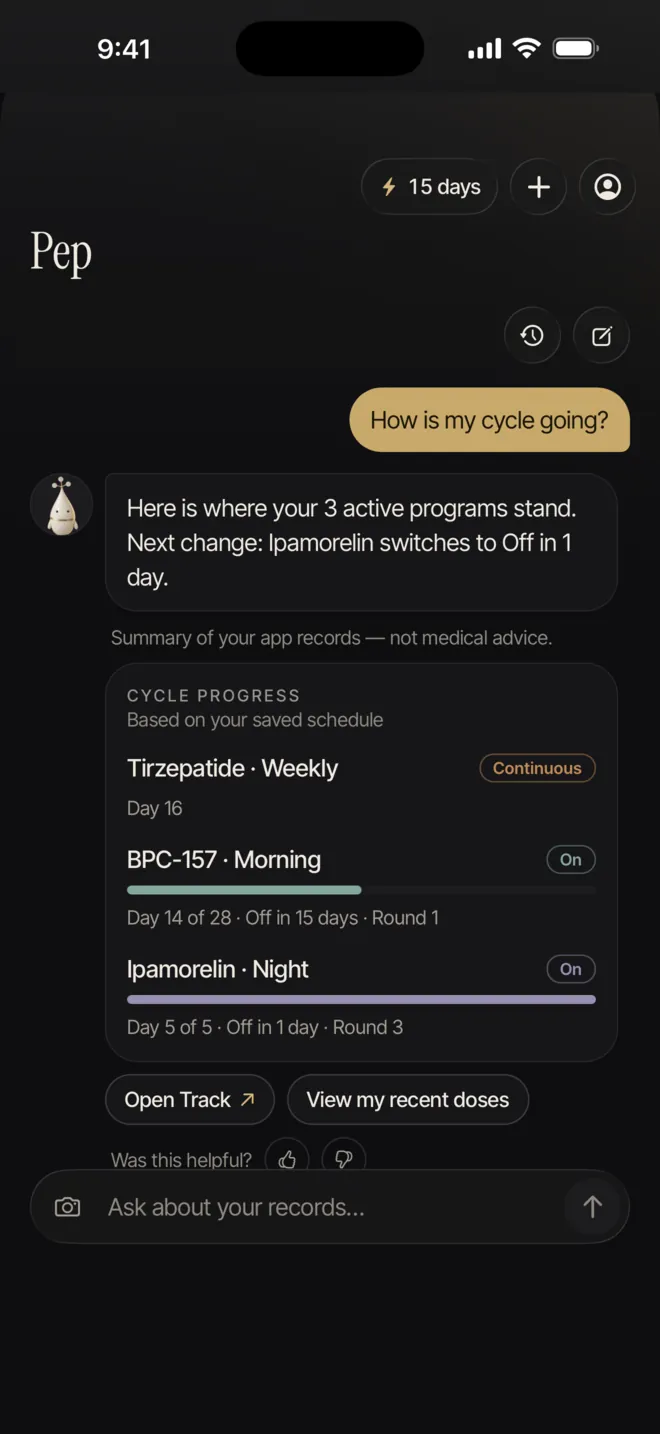 Open larger screen
A conversation with Pep about your own logs.
Reconstitution maths, and its limits
Give it the vial amount, the water added and an amount, and it shows the concentration, the volume and the units on the syringe, with each step of the calculation. If a number has no unit, or there are two candidates for one value, it asks rather than guesses. It will not work in IU, because the mg value of an IU depends on the substance.
It also flags results that are hard to measure, such as volumes under 0.05 mL or more than the syringe holds. Every result carries the same line: it is a calculation, not a recommendation, and your dose is decided with a healthcare professional.
This part never involves the AI. The arithmetic runs on your phone with the app’s own calculator logic, the question is not sent to the server, and it does not use up the daily AI allowance. A question that asks how much water you should add, rather than working from water you already added, is treated as preparation advice and declined.
What it cannot see
One caveat comes straight from the privacy policy: anything you write yourself, such as a name inside a program title or a detail in your message, can travel with the request, and the filters are not a promise of anonymity [1][2].
- Weight, nutrition and sleep records are not connected to the chat. Questions such as “how much weight have I lost?” cannot be answered there; the weight chart shows that instead.
- Side-effect check-ins are not part of the summary either, so it cannot compare how you felt after different doses.
- Apple Health and Health Connect data are never sent [1][2].
- Dose amounts, units, vial strengths and your dose notes are not part of the summary it receives. Amounts you type in a question are removed before it is sent.
- It knows only what is on this phone; it has no access to your clinician’s records.
Questions it declines
Some questions are stopped on your phone and never reach the AI: how much to take, how to reconstitute or prepare a compound, and how or where to administer it. Medical questions about side effects, safety, interactions or pregnancy are declined in the same way. The reply explains that the answer depends on your health, points you to your doctor or pharmacist and, if you feel unwell now, tells you to contact a doctor or emergency services without waiting.
As a last safeguard, if an AI reply ever contains what looks like a dose amount, PepLabo blocks it before it is shown and gives a neutral refusal instead.
How the refusals are enforced
These layers reduce risk; they cannot remove it. PepLabo’s terms say plainly that safety filters cannot stop every incorrect answer [3].
- On the phone first: a check reads each question for amount, preparation, administration and medical wording before any network call. A match gets a refusal written by the app, and nothing is sent.
- Less to work with: the summary that is sent contains no amounts, and numbers with units are stripped from your message and from earlier messages in the chat.
- Instructions to the model: Gemini is told never to suggest, compare or estimate a dose or schedule change, never to give preparation, injection or medical advice, never to write a number with a dose or volume unit, and to point anyone describing urgent symptoms to emergency services.
- A check on the way back: both the server and the app scan each reply for dose or volume amounts, and a reply that has one is replaced by a refusal before you see it.
Asking good questions
- “When was my last logged dose?”
- “How many doses did I log this week?”
- “Which vial is running low?”
- “How many days until my break starts?”
- Questions framed around what you logged work best. Questions about what you should do are the ones it is built to decline.
What is sent, and where it goes
The consent screen lists it: your message, the last few messages of the chat, and a short summary of your programs, vials and log times, never dose amounts. Your name, email and health app data are never sent. The privacy policy spells the summary out: program and compound names, frequency and times, cycle stage, how full each vial is and its estimated days left, and recent log times with skipped status, plus your language [1].
The in-app privacy screen adds that PepLabo’s server passes chat messages to the AI provider only if you agree and does not store them. The server does know your account, because it checks sign-in and counts daily use; those counts are linked to your account and are set to expire after three days [1][2].
On Google’s side, the Gemini API terms say that for paid services, prompts and responses are not used to improve Google’s products and are logged for a limited period only to detect misuse and meet legal duties. PepLabo’s policy adds that it does not promise zero retention [1][4]. Your chats themselves are kept on your phone, and only the last 10 are kept.
Turning AI off, and what keeps working
One switch under Settings › Privacy covers both the chat and meal photo estimates. Turning it off stops new requests; it does not reach back to anything already processed [1][2]. You can also choose Continue without AI on the first screen and switch it on later.
With AI off, or after the day’s AI allowance is used, the chat still answers record questions from templates built on your phone: your stack, recent doses, cycle progress and how-to help. Record summaries and reconstitution maths are part of the free version and are never locked.
Chats stay on the device. They are included when you use Settings › Transfer data › Export all data, and they are removed with everything else if you choose Delete all my data from this device.
Limits worth knowing
AI replies need you to be signed in, and there is a daily message allowance that renews every day; when it runs out, the chat can still summarise your records without AI. Messages have a length limit, and the app tells you if a long paste was cut.
An answer can read as confident and still be incomplete or out of date, and no health professional monitors these conversations [3]. Google’s own terms say its models should not be relied on for medical advice [4]. In an emergency, contact local emergency services rather than waiting on an app [3].
PepLabo AI is a way to find your own information faster. It never suggests a peptide, a dose or a program, and it is not a substitute for your clinician. Meal photo estimates are a separate Pro feature with their own guide.