What the shelf is for
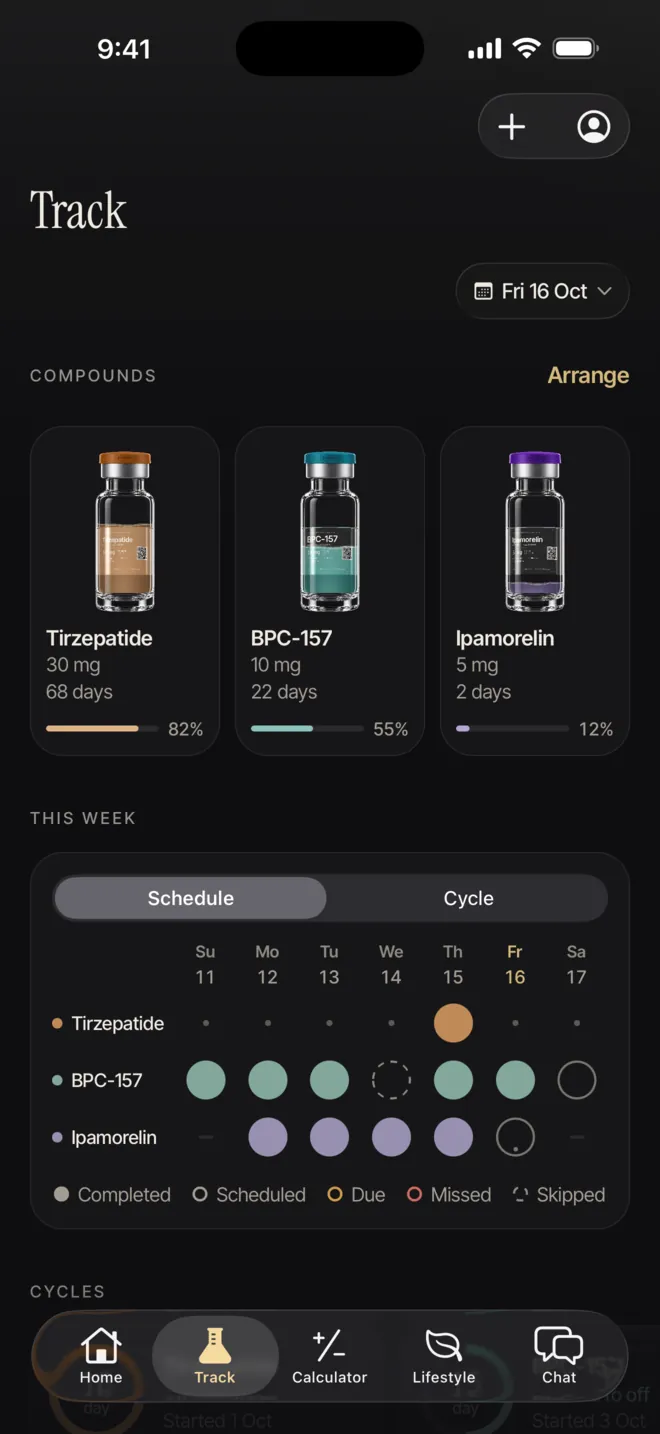
The shelf sits at the top of Track, under Compounds. Every product you add to a schedule lands there, with a bar and a percentage for the share left and a line such as “12 days of use”. Days of use count the days on which a dose is due, not calendar days; when no daily figure can be worked out, the line shows a dose count or, for packs, the pieces left. Arrange lets you drag vials into the order you prefer.
Its job is bookkeeping: what you have, what you used and which dates are coming up. It does not judge whether a product is suitable, and it never suggests a dose.
Adding a vial or pen
- Product form: vial, single-dose or multi-dose pen, cartridge, tablets and more. The form decides which fields appear.
- Vials: Total amount (up to 1000 mg), BAC water and Remaining. Leave BAC water blank or at 0 for pre-filled pens or pre-mixed vials.
- Pens and packs: Pen content, or Count in pack with Strength per unit, as printed on the label.
- Optional details: Lot number (as printed), Expiry date, Reconstituted date and a Nickname, such as “Left fridge vial”.
 Open larger screen
The shelf brings vials and schedules together.
 Open larger screen
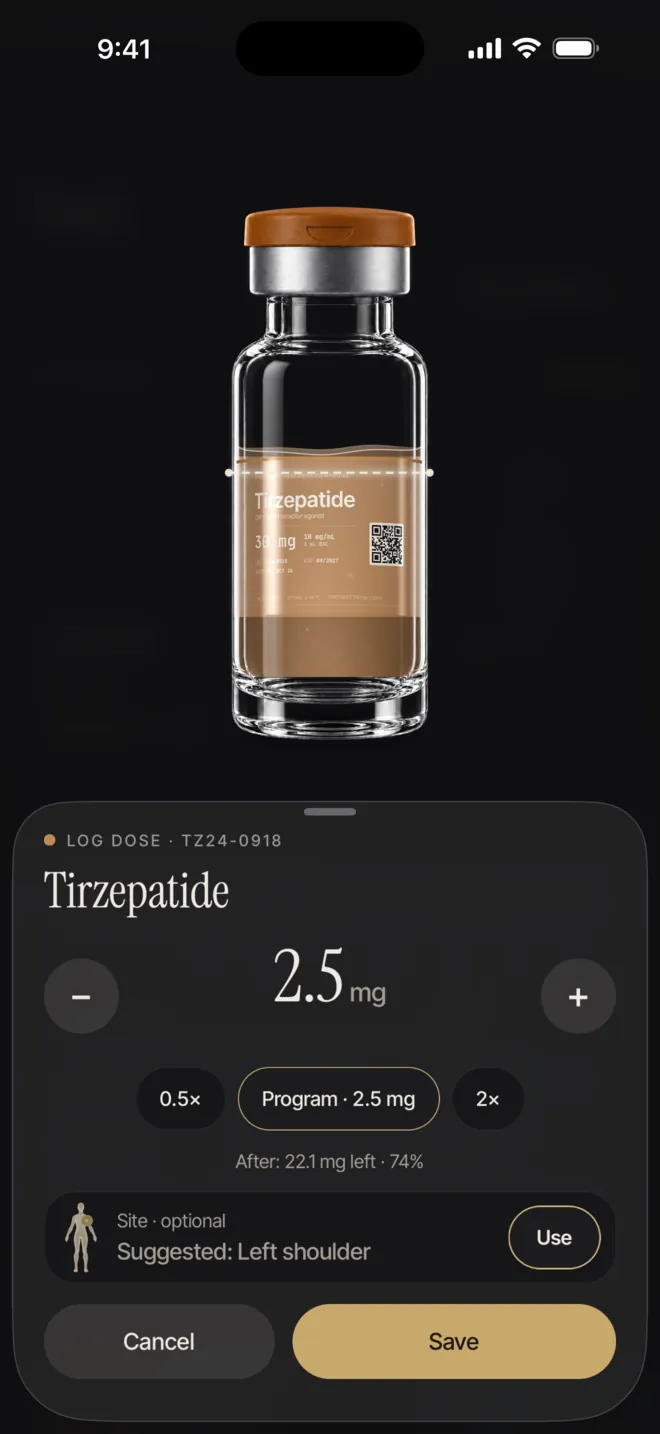
The vial view and dose logging panel.
Scanning a label
Scan vial fills the name, amount, lot and expiry from a photo of the label, taken with the camera or chosen from Photos. On iPhone the text is read with Apple Vision and on Android with ML Kit, both on the phone; the photo is not uploaded, and nothing is saved until you confirm. You can also add the vial by hand, or type the label text if the camera cannot read it.
After a scan, each field is marked by how sure the reading is. Fields that need a look say so, for example “Not sure — check it”, an amount read in IU that has to be entered in mg, an amount outside 0–1000 mg, or a date that has already passed. Labels often print only a month and year; the scan then uses the last day of that month. Confirm and add to shelf becomes available once every flagged field is checked.
How the level drains
Every dose you log is subtracted from the vial, and the share left and the days or doses figure update on their own. For a reconstituted vial, the dose sheet also shows the units to draw on a U-100 syringe for the amount you enter, and the compound screen shows the volume, all from your own numbers.
If a dose is larger than what is left, PepLabo says so and asks you to start a new vial for it. If you remove a dose from history, its amount goes back into the vial. A vial marked Not reconstituted asks for bacteriostatic water to be added before a dose can be logged.
When the app does not count
- If the pen content, the count in a pack or the strength per unit is missing, the shelf shows Amount unknown: doses are still logged, but the stock is not counted down.
- Doses entered in IU are recorded but not subtracted from a stock in mg, because there is no universal IU-to-mg factor.
- If the form is not specified, doses are recorded without any reconstitution or stock calculation.
- This is deliberate. A missing number is shown as missing, never filled in with a guess.
The dates that matter
Labels set their own limits after first use or out of the fridge, and they differ between products and even between presentations of the same medicine. The table collects what the current US labels say. It is a summary for comparison; the leaflet in your own pack and your pharmacist are what apply to you.
| Product | What the label sets | Section |
|---|---|---|
| Ozempic® pen with multiple weekly doses [1] | After first use, kept up to 56 days at 15–30 °C or in the fridge | 16 |
| Ozempic® single-dose prefilled syringe [1] | Kept in the fridge; if needed up to 28 days at 8–30 °C; discarded after use | 16 |
| Wegovy® FlexTouch® pen [2] | After first use, kept up to 56 days at 15–30 °C or in the fridge | 16 |
| Wegovy® single-dose pen or syringe [2] | If needed, up to 28 days at 8–30 °C before the cap comes off; discarded after use | 16 |
| Saxenda® pen [3] | After first use, kept up to 30 days at room temperature or in the fridge | 16 |
| Mounjaro® and Zepbound® single-dose pen or vial [4][5] | Up to 21 days in total out of the fridge, not above 30 °C | 16.2 |
| Mounjaro® and Zepbound® multi-dose vial or KwikPen, opened [4][5] | Thrown away at the first of: 30 days in total at room temperature, 30 days after first use, or 4 weekly doses, even with medicine left | 16.2 |
What PepLabo does with dates
PepLabo does not apply these rules for you. It works with the dates you enter: the Expiry date, and for a vial you reconstitute a Use after reconstitution period of 1 to 365 days, counted from the reconstitution date. The app never suggests that number; it comes from your product information or pharmacist. A powder vial keeps the period you entered, but the count only starts once you reconstitute it.
Pens, tablets and ready-mixed vials have no in-use counter, so a limit such as 56 days after first use is not tracked by the shelf. When either date is a week away or less, the shelf line switches to a short form such as “Exp: 12 days” or “Recon: 5 days”, and the compound screen spells it out, for example “Use period: 5 days left”; the warning colour appears only in the last two days.
Reminders from the shelf
- Vial vault (on by default): a week before the earlier of the expiry date and the end of your use period, and again on the day, about an hour after your day starts.
- Low stock (under Log reminders, off by default): about 3 days before a vial is expected to run out, based on your schedule. It is not set if fewer than 3 days are already left.
- Both can be switched on or off under Settings › Notifications, and Hide peptide names keeps the vial name off the lock screen.
When a vial is finished
When a dose you log from a vial empties it, PepLabo plays a short finish moment, drops the vial into the sharps bin on screen and archives it, so the shelf only shows what is in use. A Vial archived message offers Undo if that was a mistake. A record whose amount is unknown is never treated as finished. Your dose history keeps every entry, and the archived vial keeps its lot number if you added one.
Needles, syringes and used pens need safe disposal. The FDA advises placing sharps in a sharps disposal container right after use and following your community’s rules for getting rid of the container [6].
Ozempic®, Wegovy®, FlexTouch® and Saxenda® are registered trademarks of Novo Nordisk A/S. Mounjaro® and Zepbound® are registered trademarks of Eli Lilly and Company. PepLabo is not affiliated with or endorsed by Novo Nordisk or Eli Lilly and Company.